


Tutorials
What are Agent Skills? Your Guide to Skills
Agent Skills are a new standard that simplifies context management for context-specific tasks. This means a modular structure, less context-bloat, and better overall agent performance.
What are Agent Skills?
Agent Skills (or Skills) are a new standard introduced by Anthropic for giving agents "modular capabilities" that are dynamically loaded [1]. Skills solve the problem of loading specific context and code only when needed, rather than including unnecessary context that will inevitably degrade agent performance (context bloat).
Examples of "modular capabilities," AKA Skills are:
Skills to work with Google Sheets
Skills for how your team conducts code review
Skills for coding agents on React best practices
With Skills, agents can dynamically load context on how to work with Google Sheets, how your team reviews code, and how to best work with React. Skills can also include code/scripts for use cases like Google Sheets or GitHub API calls.
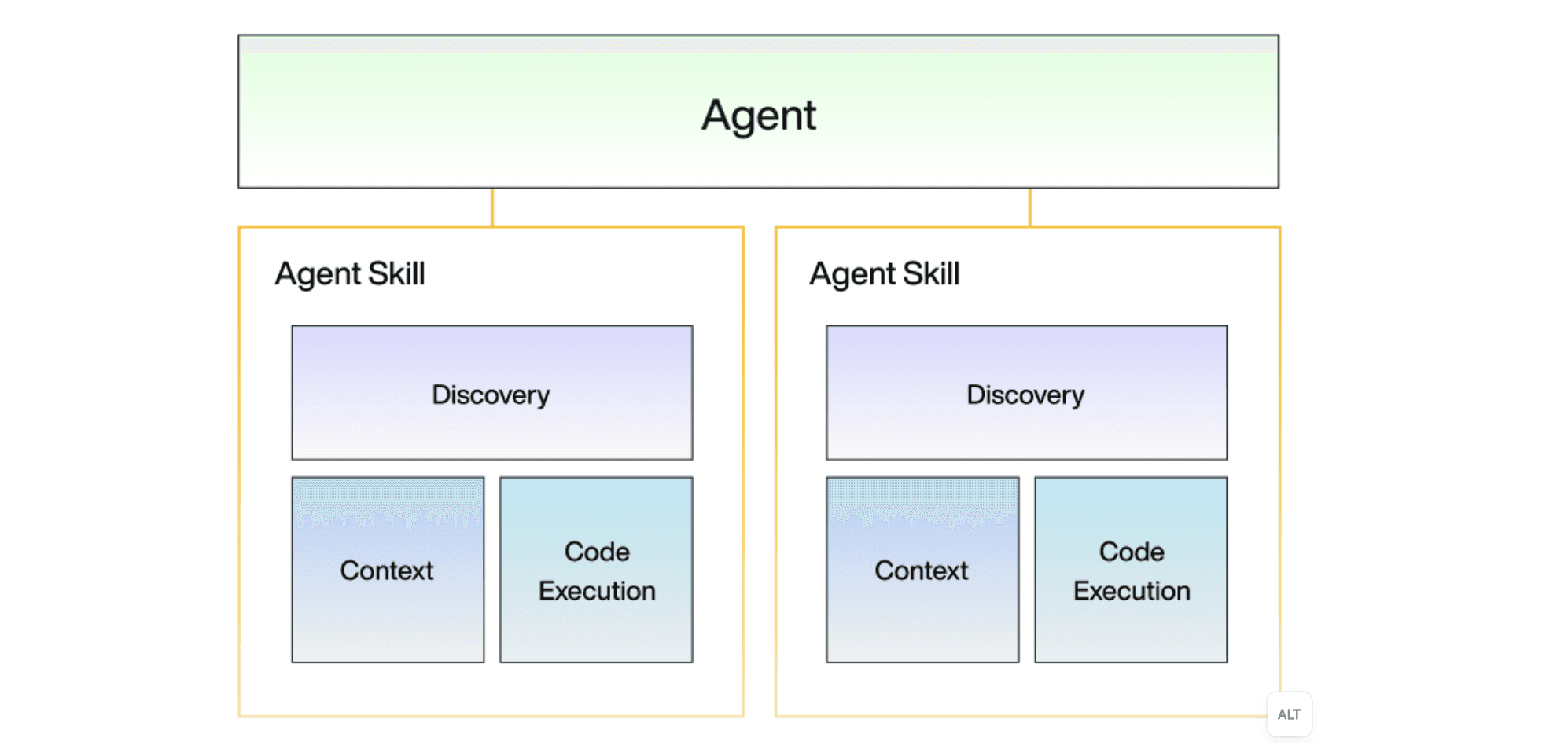
What makes Agent Skills different from tools, MCP, and slash commands is that Skills package discovery, context, and code execution together in an efficient vehicle, without bloating the context window (more on this later).
How do Agent Skills work?
Discovery
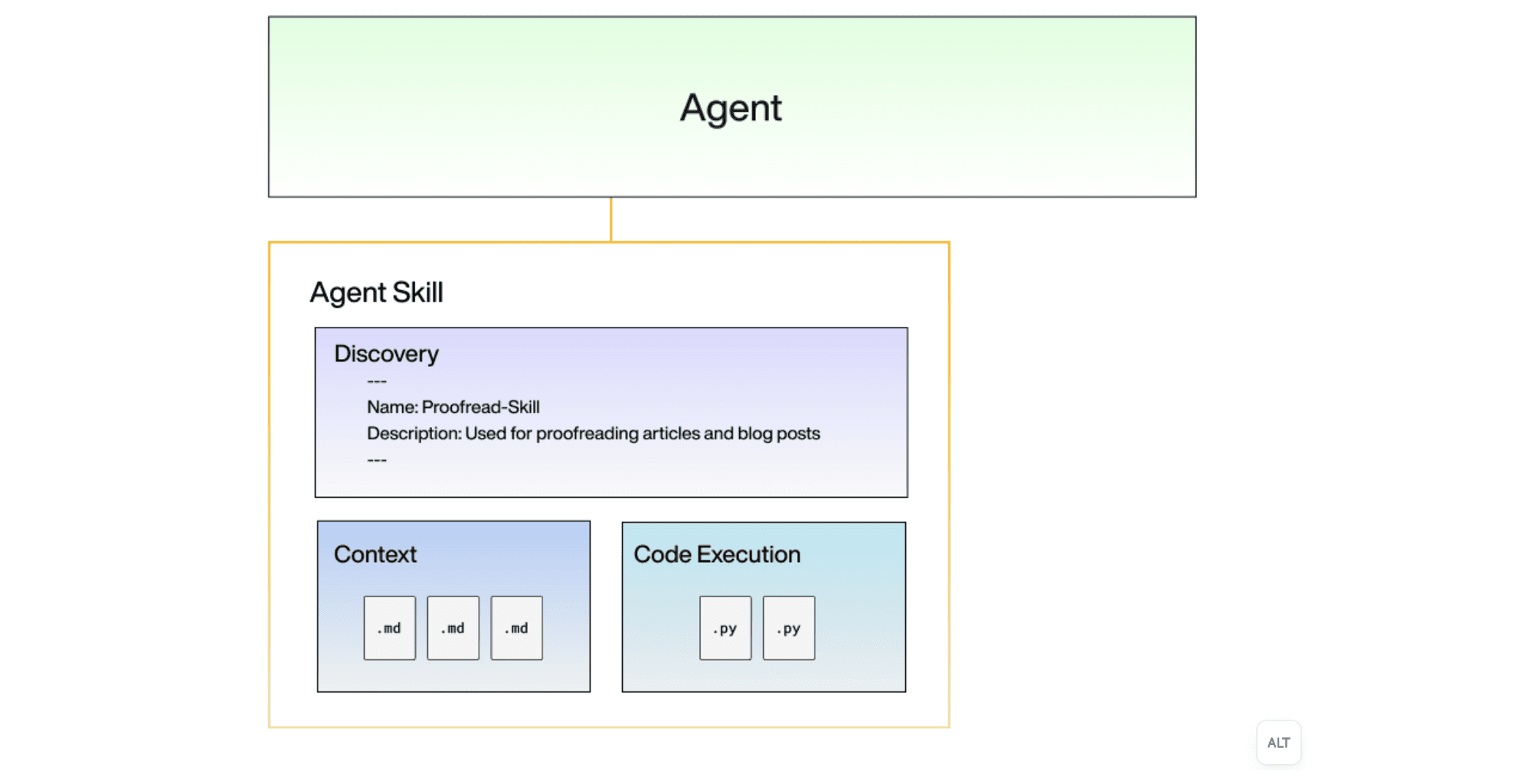
While Agent Skills may seem complex, under the hood, Skills are just a directory of markdown files and scripts that conform to the Skills standard. The entry point to an Agent Skill is the SKILL.md file with a name and description at the top of the file. The Skill name and description are the only context loaded with each prompt.
The rest of the SKILL.md file should have context relevant to your skill. For example, in our proofreading Skill for reviewing articles, we may want to include specific instructions on how the agent should proofread, what tools to use, or how to use subagents to parallelize work.
Context loading
The agent uses the Skill name and description to determine whether a skill is needed, and the additional context is loaded only when the skill is called on. This pattern is known as "progressive disclosure,” where context is delivered in stages rather than all upfront [2].
You can further build on progressive disclosures by using the SKILL.md as a table of contents to reference other markdown files in your Skills directory. This allows your agent to progressively discover additional context.

Code execution
In addition to markdown files, scripts can also be included to run commonly used code, giving Skills a tool calling feel.
For example, in our proofreading skill, we may want to include scripts that interact with file/document integrations (Notion, Google Drive, Confluence), so agents can upload revisions directly to our users' SaaS tools. This type of 3rd-party action is the type of problem Paragon's integration infrastructure simplifies. ActionKit handles authentication and simplifies 3rd-party APIs, making it simple to work with your users' Notion, Google Drive, or Confluence in a tool call or Skill script.
With markdown for context and scripts for code execution, an Agent Skill can be structured like the example below and loaded into any agent that supports Skills (i.e. Claude Code, OpenCode, Cursor)
Agent Skills in action
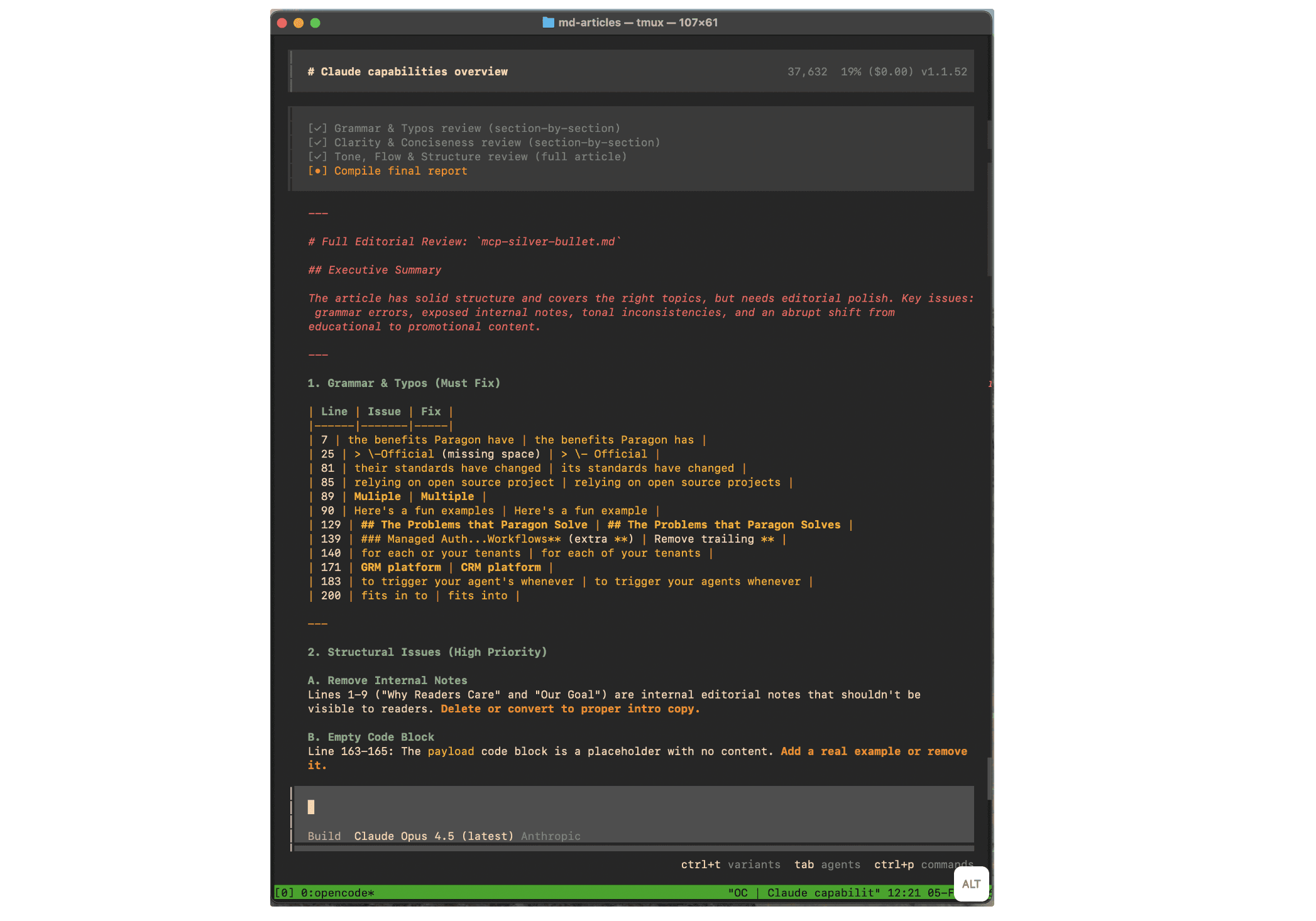
You’ve seen the mechanics of Skills and how they’re developed. Here's how Skills are used by an agent like OpenCode (this example uses the proofread-skill we’ve been referencing above).
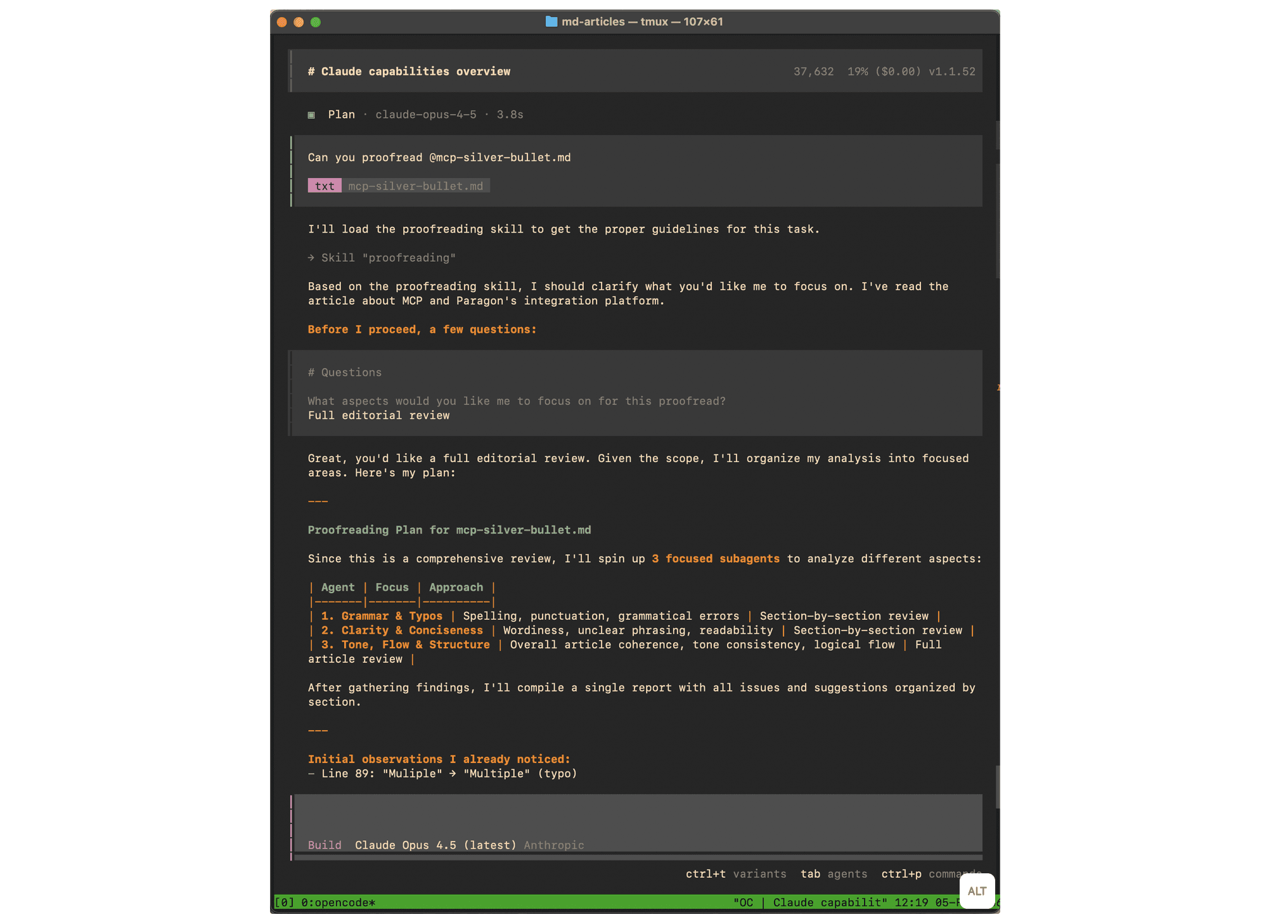
Agent loads the skill from
SKILL.mdinto its contextAgent creates a plan using the subagent instructions in the
SKILL.mdAgent spins up subagents and provides an in-depth proofread
When should you implement Agent Skills
Agent Skills are not magic. Agent Skills are just markdown files and scripts wrapped in a harness that makes it easy for LLMs to discover markdown files, load context from files dynamically, and run code from scripts.
If you're building an agent, you should consider implementing Skills if your agent has:
1. Specialized capabilities that only need to be applied in specific situations
Skills progressively disclose context so that long markdown files and descriptions don't get sent with every prompt. At the same time, when your agent needs those files and descriptions, they are loaded when intent for a skill is detected.
2. Context management requirements with long & complex tasks
All agents (no matter what model) perform better with less context bloat. Progressive disclosure reduces unnecessary context for those long-running tasks where your agent may be in a loop, with multiple messages and tool calls to keep in context.
3. Extensibility features where developers and users alike can add capabilities and code
Heavyweight standards like MCP and A2A require familiarity with code and intimate knowledge of the standard. In contrast, Agent Skills are just markdown files in folders that anyone can author. Your developers can ship agent features faster, and your users may even want to extend your agent with their own custom skills!
When Agent Skills are not the right solution
Skills were developed to solve the context management problem. Skills aren’t a catch-all solution for every agent use case. For example:
1. RAG with dynamic context
In a way, Skills are performing Retrieval-Augmented Generation where the retrieved context is static markdown files. When you need to retrieve external context that’s dynamic and up-to-date, existing RAG solutions like vector search, graph queries, and text-to-SQL are better solutions. While indexing and keeping data up-to-date in databases can be a heavy engineering effort, it's still the best way to supply agents with a wealth of user-specific knowledge.
It's one of the reasons Paragon users use Managed Sync. Paragon manages the infrastructure for pulling your users' 3rd-party integration data (Google Drive files, CRM records, and ServiceNow tickets) so you can pull the data with just an API call.
2. Routine code execution
Skills can execute code through scripts, but tools are still the preferred method for code execution that needs to be consistently run. Tools send their descriptions with every call. Thus, they are more discoverable and consistent than scripts that are discoverable only through nested markdowns. In general, it's best to keep code that needs to be commonly run in tools, and code specific to a capability in Skills.
3. Overarching context
Progressive disclosure, the pattern used by Agent Skills, avoids full upfront context loading. But the cost of progressive disclosure is that if the Skill is not called upon, then the Skill's context is never loaded. In Vercel's article on AGENTS.md vs Skills, they found that Skills weren't always reliably triggered in their NextJS benchmarks.
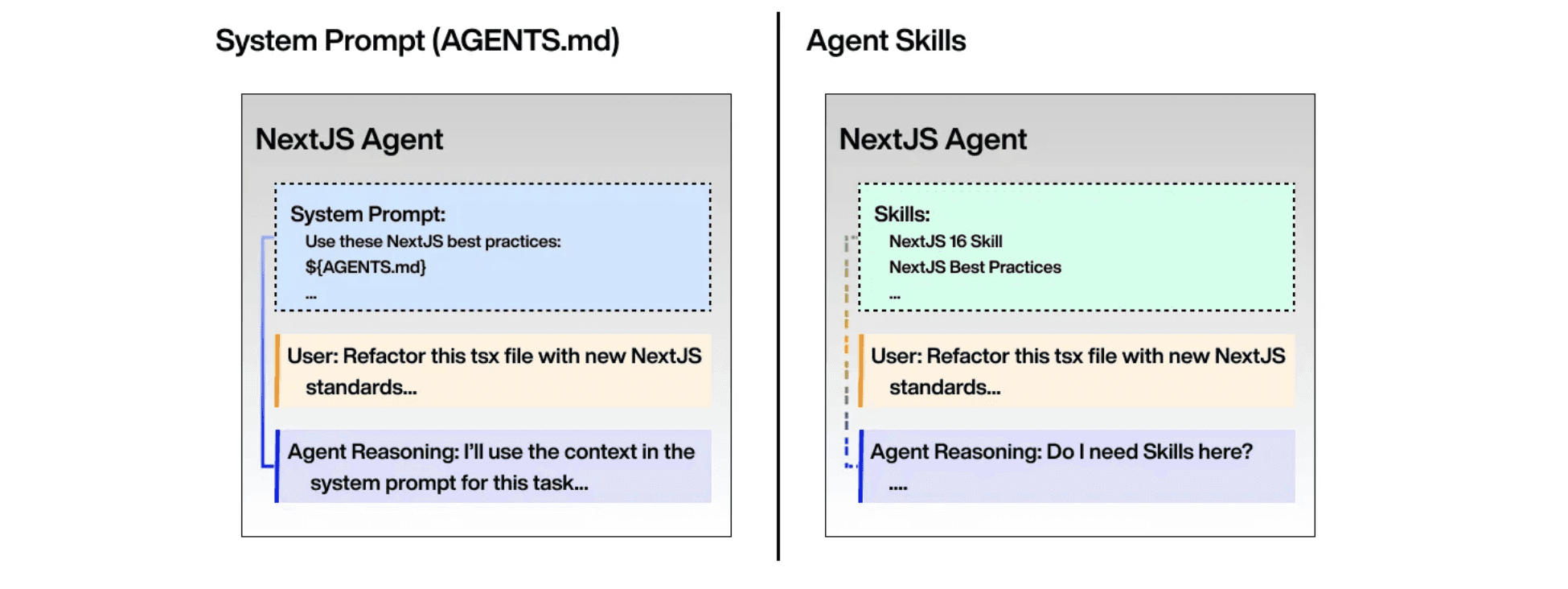
System prompts are still the most reliable way to ensure context on an agent's purpose and important instructions are always respected by the agent.
4. Multi-tenancy, authentication, and client-server architecture
This deserves a more in-depth discussion on the role of MCP Servers, which brings us to…
How do Agent Skills fit with MCP?
When a new standard is released, it's natural to question if the new standard (Agent Skills) replaces old standards (MCP).
For certain MCP use cases, Agent Skills is an ergonomically better way to provide context and code for agents to run. Writing SKILL.md files is much easier than developing MCP Servers, and sharing these Skills via markdown files is also easier than connecting an MCP Client to an MCP Server.
But what MCP offers over Skills is:
Multi-tenancy: MCP Servers can serve multiple MCP Clients and provide each client with a different tools, prompts, and resources.
Authentication: Remote, multi-tenant MCP servers use HTTP which can securely transport OAuth credentials and tokens (important for 3rd-party APIs and integrations).
Defined tools: Tools are a first-class primitive for LLMs and don't require a local environment or sandbox to execute in an MCP server (Skill scripts are bash commands; for multi-tenant apps, bash is dangerous to run without a dedicated sandbox per tenant).
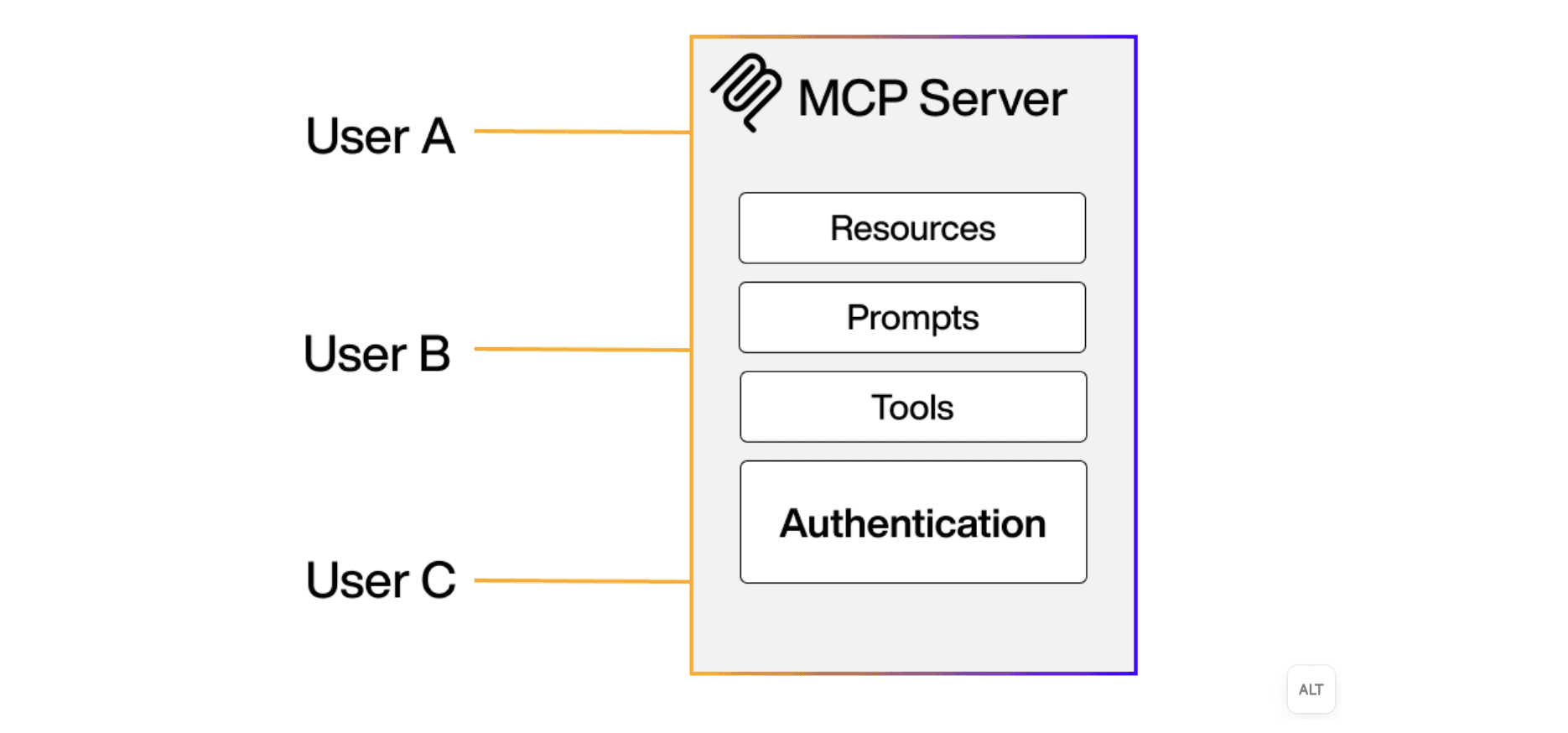
Use MCP if your agent needs to handle multiple tenants within a single server/environment. MCP's Server-Client architecture is heavier than Skills' directory-based structure, but the MCP standard is built to be able to run remotely with authentication.
Many MCP Servers have already been developed by SaaS companies and in open source. For example, Paragon's ActionKit MCP can be easily self-hosted to provide hundreds of different integration tools for multi-tenant SaaS applications. Using these pre-built MCP Servers takes away much of the upfront effort in implementing multi-tenant agent applications.
Wrapping Up
Agent Skills is solving the universal context bloat problem with a simple and effective solution. Agent Skills can be used by any LLM model and integrated into any LLM harness.
Likewise, Paragon is an integrations infrastructure platform that can work with any LLM or agent framework. Our customers use Paragon to integrate their agents with Slack, Google Drive, and Jira, just to name a few. Paragon's platform offers:
ActionKit to instantly provide an agent with 700+ integration tools like
SEND_SLACK_MESSAGEandUPDATE_SALESFORCE_CONTACTManaged Sync for production-level RAG ingestion & permissions on knowledge bases like Google Drive, Confluence, Salesforce, and ServiceNow.
If you're interested in building the best agents with integrations your users will love, try Paragon on a free trial or book a demo with our team.
Citations & Resources
[1] https://platform.claude.com/docs/en/agents-and-tools/agent-skills/overview
[2] https://platform.claude.com/docs/en/agents-and-tools/agent-skills/best-practices
[3] https://vercel.com/blog/agents-md-outperforms-skills-in-our-agent-evals
CHAPTERS
TABLE OF CONTENTS

Jack Mu
,
Developer Advocate
mins to read
"/><stop offset="1" stop-color="rgb(145, 118, 251)"/></linearGradient><linearGradient id="ozqTbFI9H-1807422454-linear-gradient" x1="0.49751243781094523" x2="0.5024875621890548" y1="0" y2="1"><stop offset="0" stop-color="rgba(97, 64, 229, 0.16)"/><stop offset="1" stop-color="rgb(145, 118, 251)"/></linearGradient><linearGradient id="pE26o4gxW-1807422454-linear-gradient" x1="0.49751243781094523" x2="0.5024875621890548" y1="0" y2="1"><stop offset="0" stop-color="rgba(97, 64, 229, 0.16)"/><stop offset="1" stop-color="rgb(145, 118, 251)"/></linearGradient><linearGradient id="HHOgKLOd0-1807422454-linear-gradient" x1="0.49751243781094523" x2="0.5024875621890548" y1="0" y2="1"><stop offset="0" stop-color="rgba(97, 64, 229, 0.16)"/><stop offset="1" stop-color="rgb(145, 118, 251)"/></linearGradient></defs><path d="M 6.434 119.935 C 2.798 117.846 0.98 116.802 0.383 115.445 C -0.138 114.262 -0.127 112.912 0.413 111.738 C 1.033 110.391 2.866 109.376 6.535 107.346 L 186.592 7.74 C 194.253 3.502 198.084 1.383 202.139 0.552 C 205.728 -0.184 209.429 -0.184 213.018 0.552 C 217.073 1.383 220.903 3.502 228.565 7.741 L 408.621 107.346 C 412.29 109.376 414.124 110.391 414.744 111.738 C 415.284 112.912 415.295 114.262 414.774 115.445 C 414.176 116.802 412.358 117.846 408.723 119.935 L 229.174 223.08 C 221.305 227.6 217.37 229.861 213.189 230.746 C 209.489 231.529 205.667 231.529 201.967 230.746 C 197.786 229.861 193.852 227.6 185.982 223.08 Z" fill="url(%23lhM4UE7y4-1807422454-linear-gradient)" height="231.33281694397522px" id="lhM4UE7y4" transform="translate(5 0)" width="415.15720989312115px"/><path d="M 3.528 66.547 C 2.242 65.781 1.598 65.398 1.131 64.869 C 0.717 64.4 0.406 63.851 0.215 63.257 C 0 62.585 0 61.837 0 60.339 L 0 9.188 C 0 5.09 0 3.041 0.86 1.854 C 1.611 0.818 2.765 0.15 4.037 0.016 C 5.495 -0.14 7.272 0.881 10.825 2.922 L 190.662 106.233 C 198.532 110.754 202.466 113.014 206.647 113.899 C 210.347 114.682 214.169 114.682 217.869 113.899 C 222.05 113.014 225.985 110.754 233.854 106.233 L 413.691 2.922 C 417.245 0.881 419.022 -0.14 420.479 0.016 C 421.75 0.15 422.905 0.819 423.655 1.854 C 424.516 3.041 424.516 5.09 424.516 9.188 L 424.516 64.78 C 424.516 66.303 424.516 67.065 424.294 67.746 C 424.098 68.349 423.777 68.904 423.352 69.375 C 422.871 69.907 422.211 70.286 420.89 71.045 L 234.252 178.262 C 226.245 182.862 222.242 185.162 217.992 186.041 C 214.232 186.818 210.35 186.787 206.602 185.95 C 202.367 185.005 198.4 182.642 190.467 177.915 L 3.527 66.547 Z" fill="url(%23ozqTbFI9H-1807422454-linear-gradient)" height="186.6011677519727px" id="ozqTbFI9H" transform="translate(0 153)" width="424.51599999999996px"/><path d="M 3.528 66.546 C 2.242 65.78 1.598 65.396 1.131 64.867 C 0.717 64.399 0.406 63.85 0.215 63.256 C 0 62.584 0 61.835 0 60.338 L 0 9.188 C 0 5.09 0 3.04 0.86 1.854 C 1.611 0.818 2.765 0.15 4.037 0.016 C 5.495 -0.14 7.272 0.881 10.825 2.922 L 190.662 106.232 C 198.532 110.752 202.466 113.013 206.647 113.898 C 210.347 114.681 214.169 114.681 217.869 113.898 C 222.05 113.013 225.985 110.752 233.854 106.232 L 413.691 2.922 C 417.245 0.881 419.022 -0.14 420.479 0.016 C 421.75 0.15 422.905 0.819 423.655 1.854 C 424.516 3.04 424.516 5.09 424.516 9.188 L 424.516 64.778 C 424.516 66.302 424.516 67.063 424.294 67.745 C 424.098 68.347 423.777 68.902 423.352 69.373 C 422.871 69.905 422.211 70.285 420.89 71.044 L 234.252 178.261 C 226.245 182.861 222.242 185.161 217.992 186.039 C 214.232 186.816 210.35 186.785 206.602 185.949 C 202.367 185.003 198.4 182.64 190.467 177.914 L 3.527 66.546 Z" fill="url(%23pE26o4gxW-1807422454-linear-gradient)" height="186.5992791581399px" id="pE26o4gxW" transform="translate(0 261)" width="424.51599999999996px"/><path d="M 3.528 62.172 C 2.242 61.406 1.598 61.023 1.131 60.494 C 0.717 60.026 0.406 59.477 0.215 58.882 C 0 58.21 0 57.462 0 55.965 L 0 9.1 C 0 5.067 0 3.051 0.848 1.87 C 1.588 0.84 2.727 0.168 3.987 0.019 C 5.43 -0.151 7.195 0.825 10.724 2.777 L 191.044 102.529 C 198.785 106.811 202.655 108.952 206.749 109.779 C 210.373 110.511 214.109 110.494 217.726 109.729 C 221.812 108.864 225.663 106.688 233.364 102.335 L 305.348 61.648 C 308.891 59.646 310.662 58.645 312.114 58.807 C 313.38 58.948 314.528 59.618 315.274 60.65 C 316.129 61.834 316.129 63.869 316.129 67.939 L 316.129 121.417 C 316.129 122.925 316.129 123.679 315.911 124.355 C 315.718 124.953 315.403 125.505 314.984 125.974 C 314.512 126.504 313.861 126.886 312.561 127.649 L 234.368 173.545 C 226.323 178.267 222.301 180.628 218.019 181.542 C 214.231 182.351 210.313 182.338 206.53 181.505 C 202.254 180.563 198.247 178.175 190.233 173.401 Z" fill="url(%23HHOgKLOd0-1807422454-linear-gradient)" height="182.13937459493218px" id="HHOgKLOd0" transform="translate(0 369.5)" width="316.1290000000001px"/></svg>)

