ActionKit, Composio, MCP: A Comparison of Tool Providers
ActionKit is Paragon's purpose-built product for AI agent tools. Compare the mechanics, developer experience, and performance of ActionKit against Composio and 3rd-party MCPs.
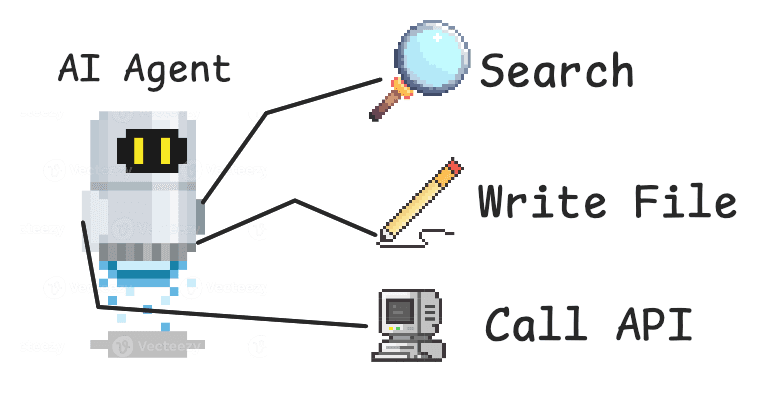
Tools define what it means to be an agent. In order for LLM-powered products to take action on behalf of users, they need useful tools to create files, search data sources, and call APIs.
And so when you’re building an AI agent product, your agent should have both tools that are unique to your platform and tools that integrate with other platforms. Here are some examples of integration tool use cases:
If you’re building a sales agent, you’ll want tools that integrate with HubSpot.
If you’re building a customer support agent, you’ll want tools that integrate with ServiceNow.
Most agents can benefit from tools that integrate with Slack, Google Drive, Notion.
You could build these tools in-house using 3rd-party APIs. Or you could use a tool provider. Tool providers include open-source tools like MCP servers and integration platform APIs like Paragon’s ActionKit.
In this in-depth guide, we’ll be comparing ActionKit, Composio, and MCP tool providers so you can be better informed on your build vs. buy decision and what tool providers to look into. We’ll answer:
How do tool providers work?
What are the differences in developer experience?
What are the performance differences for tool-calling agents?
How Tool Providers Work
Tool providers like ActionKit, Composio, and MCP servers deliver tools your agent can use out-of-the-box. For integration tools, tool providers have two components:
1. An agent-usable schema with thoughtfully designed descriptions and inputs
{
name:"GITHUB_CREATE_ISSUE",description:"Create an Issue",parameters:{
type:"object",properties:{
owner:{
type:"string",description:"Owner : Specify the name of the account owner of the associated repository for this Issue. (example:\\"abc\\")"},
repo:{type:"string",description:"Repository : Specify the name of the associated repository for this Issue."},
title:{type:"string",description:"Issue Title : Specify the title of the issue to create."},
body:{type:"string",description:"Issue Body : Specify the body contents of the issue to create."},
assignees:{type:"string",description:"Assignees : Specify the assignee(s)' GitHub login as an array of strings for this issue. (example:\\"[\\"octocat\\"]\\")"}},
required:[owner,repo,title],additionalProperties:false}}
{
name:"GITHUB_CREATE_ISSUE",description:"Create an Issue",parameters:{
type:"object",properties:{
owner:{
type:"string",description:"Owner : Specify the name of the account owner of the associated repository for this Issue. (example:\\"abc\\")"},
repo:{type:"string",description:"Repository : Specify the name of the associated repository for this Issue."},
title:{type:"string",description:"Issue Title : Specify the title of the issue to create."},
body:{type:"string",description:"Issue Body : Specify the body contents of the issue to create."},
assignees:{type:"string",description:"Assignees : Specify the assignee(s)' GitHub login as an array of strings for this issue. (example:\\"[\\"octocat\\"]\\")"}},
required:[owner,repo,title],additionalProperties:false}}
{
name:"GITHUB_CREATE_ISSUE",description:"Create an Issue",parameters:{
type:"object",properties:{
owner:{
type:"string",description:"Owner : Specify the name of the account owner of the associated repository for this Issue. (example:\\"abc\\")"},
repo:{type:"string",description:"Repository : Specify the name of the associated repository for this Issue."},
title:{type:"string",description:"Issue Title : Specify the title of the issue to create."},
body:{type:"string",description:"Issue Body : Specify the body contents of the issue to create."},
assignees:{type:"string",description:"Assignees : Specify the assignee(s)' GitHub login as an array of strings for this issue. (example:\\"[\\"octocat\\"]\\")"}},
required:[owner,repo,title],additionalProperties:false}}
{
name:"GITHUB_CREATE_ISSUE",description:"Create an Issue",parameters:{
type:"object",properties:{
owner:{
type:"string",description:"Owner : Specify the name of the account owner of the associated repository for this Issue. (example:\\"abc\\")"},
repo:{type:"string",description:"Repository : Specify the name of the associated repository for this Issue."},
title:{type:"string",description:"Issue Title : Specify the title of the issue to create."},
body:{type:"string",description:"Issue Body : Specify the body contents of the issue to create."},
assignees:{type:"string",description:"Assignees : Specify the assignee(s)' GitHub login as an array of strings for this issue. (example:\\"[\\"octocat\\"]\\")"}},
required:[owner,repo,title],additionalProperties:false}}
2. A tool execution layer that simplifies API use
Simplifying API use means creating abstractions designed for agents to use that may perform multiple operations in the backend. A tool that searches for a Notion page may call the GET /search and GET /contents endpoints. Wrapping both API calls within one atomic tool that makes sense for agents will improve tool-calling.
Simplifying API use also means managing authentication so your agent can perform actions on behalf of your users using either their credentials or an org’s. An agent with GitHub tools will only be able to search or create PRs for repos the user has access to.
Tool providers are built for agents, but they should also feel good for developers to implement. That’s why when evaluating tool providers, we should be evaluating developer experience (DX) and performance. Let’s start with DX!
Best Developer Experience
Integration tools all start with auth to call tools on your end-users’ behalf, so let’s start there.
Configuring Auth
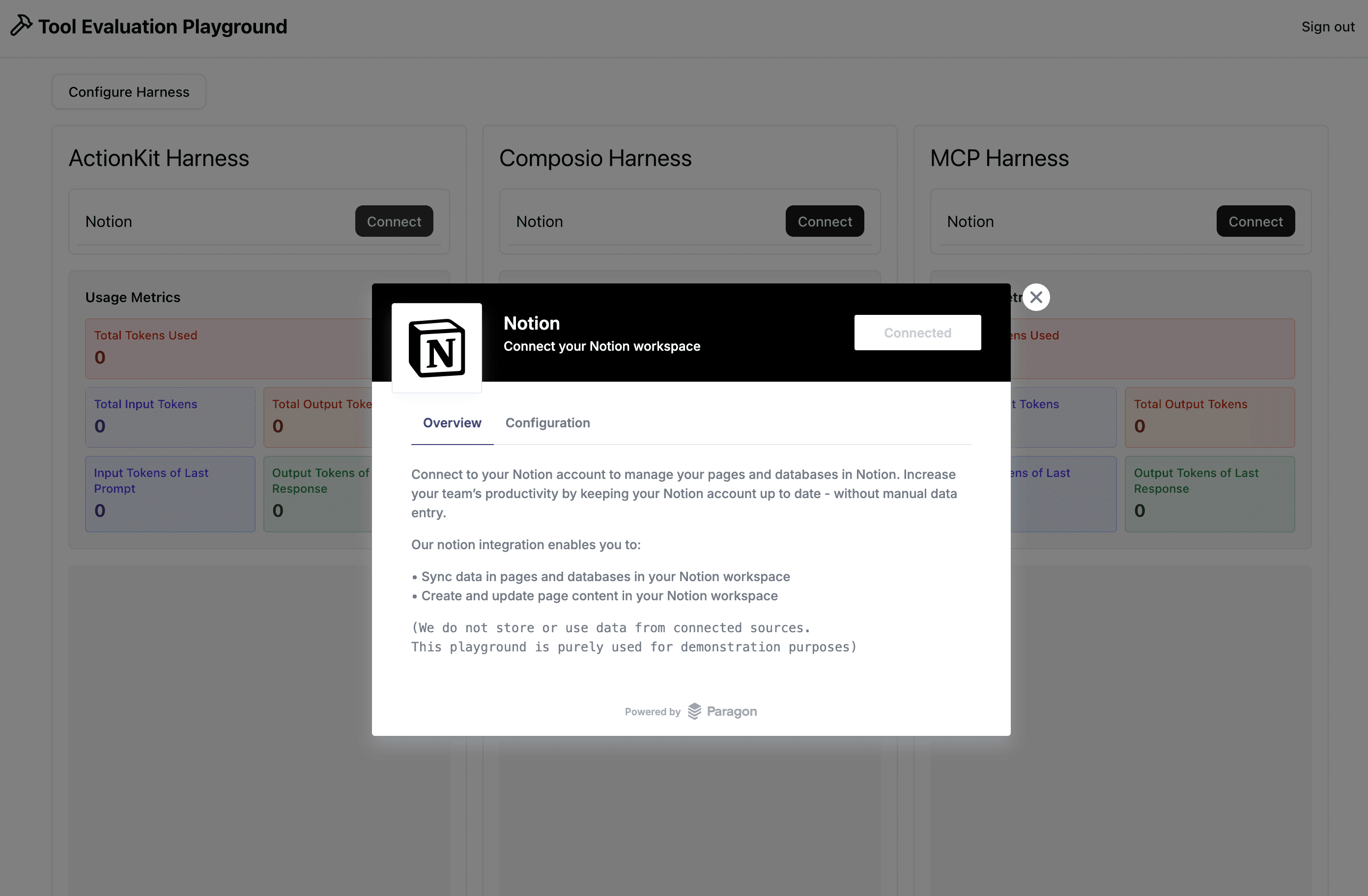
Tool providers with integration tools will have an auth mechanism for the end-user to log in with the integration provider. This may be an embedded auth like Paragon’s pictured below, or a redirect that goes through the OAuth process.
Starting with Paragon’s ActionKit, embedding the Connect Portal for users to authenticate within your app is done on your frontend with Paragon’s SDK. Using a Paragon signing key, developers can sign a JWT, authenticate with Paragon, and call the connect method to bring up the embedded Connect Portal.
With Composio, you use their API key to initialize their SDK and use their SDK’s link method to grab a redirect URL. Unlike Paragon, the OAuth process is done via redirect rather than a popup.
In the MCP space, there are different authentication practices. The most secure for remote MCPs (non-self-hosted) are using OAuth, which the MCP protocol supports in their latest versions.
Implementing OAuth via MCP for the performance comparison exercise (more on this below), we found the developer experience more cumbersome because MCP endpoints aren’t always well documented and assume the developer is familiar with RFC standards. For OAuth MCP connections, you have to discover scopes, discover metadata, configure the right headers, and configure the right transport before going through the OAuth flow. I won’t go through the full logic, but just look at the sheer number of imports from the MCP SDK. It took a lot longer to implement the MCP authentication pattern compared to ActionKit and Composio’s implementation.
Despite MCP’s recognition as a standard, MCP is quite new and has changed multiple times. Using multiple MCP servers in conjunction may not have as standard of an implementation as you may think, given that there are different transports (stdio, SSE, HTTP) and different authentication methods (hard-coded configs, OAuth). From this perspective, using multiple MCPs is not quite as good of a developer experience as it may be in the future as the protocol matures.
Loading Tools
MCP Implementation
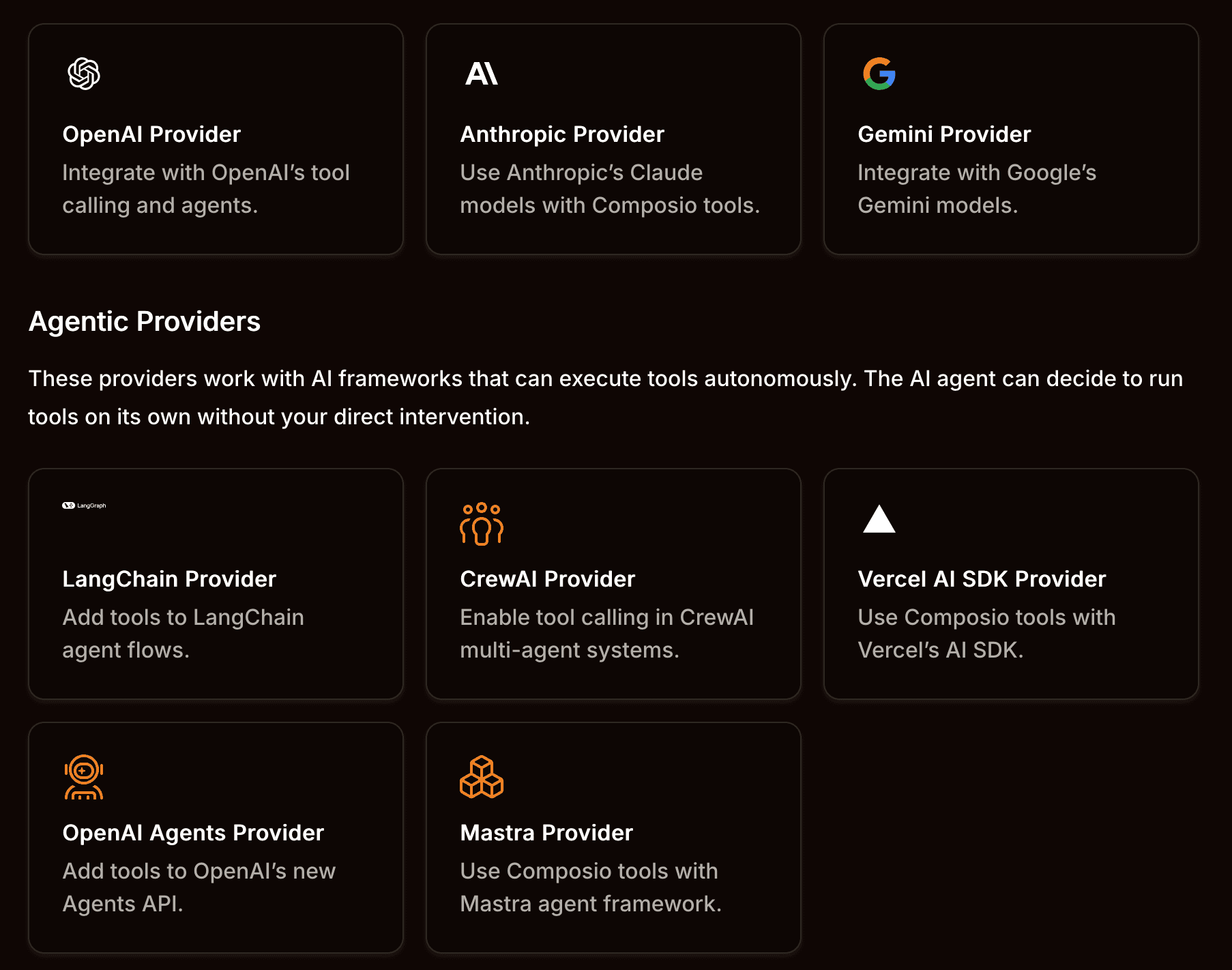
Tools at the end of the day are just interfaces with descriptions, inputs, and code to execute. Whether it’s API or MCP, the tool interface can be sent with either method and plugged into any LLM that supports the tool schema. ActionKit and Composio actually have tools available via API and MCP.
The difference in using ActionKit and Composio’s MCP is that you can use one MCP to access tools across different API providers like Notion, Slack, and Google Drive. With open-source MCP servers, you would need 3 separate servers and implementations.
The advantage of MCP is that implementing tools (after establishing connection) is truly “plug-and-play” for any LLM provider. Borrowing an example from Vercel’s AI-SDK, you can see how easy it is to load tools from an MCP server.
client = awaitcreateMCPClient({transport:newExperimental_StdioMCPTransport({command:'node server.js',}),});constresponse = awaitgenerateText({model:"anthropic/claude-sonnet-4.5",tools,messages:[{role:'user',content:'Query the data'}],});
client = awaitcreateMCPClient({transport:newExperimental_StdioMCPTransport({command:'node server.js',}),});constresponse = awaitgenerateText({model:"anthropic/claude-sonnet-4.5",tools,messages:[{role:'user',content:'Query the data'}],});
client = awaitcreateMCPClient({transport:newExperimental_StdioMCPTransport({command:'node server.js',}),});constresponse = awaitgenerateText({model:"anthropic/claude-sonnet-4.5",tools,messages:[{role:'user',content:'Query the data'}],});
client = awaitcreateMCPClient({transport:newExperimental_StdioMCPTransport({command:'node server.js',}),});constresponse = awaitgenerateText({model:"anthropic/claude-sonnet-4.5",tools,messages:[{role:'user',content:'Query the data'}],});
However, your agent implementation may have additional logic like filtering (useful for loading only relevant tools in context). For any more advanced implementation where tool loading and use needs to be modified, it’s no longer plug-and-play. For the filtering use case, API and MCP have basically the same developer experience, where you’ll have to implement some custom logic like this:
Focusing on API implementations of tools, Composio offers a different approach to loading tools. Their SDK provides tools with raw data (for descriptions, inputs and execution) and tools that are configured for popular providers. Another feature of their SDK is a method that loads only specific tools.
ActionKit was designed with flexibility top-of-mind. Tool names and descriptions can be filtered within your code. Your tools’ code execution can even be modified by adding custom logic that leverages ActionKit API calls within the tool execution.
constresponse=awaitfetch(`https://actionkit.useparagon.com/projects/${process.env.NEXT_PUBLIC_PARAGON_PROJECT_ID}/actions`,{headers:{Authorization:`Bearer${user.paragonUserToken}`,},});consttools=awaitresponse.json();...tool({description:tools.function.description,inputSchema:jsonSchema(tools.function.parameters),execute:async(params:any)=>{constresponse=awaitfetch(`https://actionkit.useparagon.com/projects/${process.env.NEXT_PUBLIC_PARAGON_PROJECT_ID}/actions`,{method:"POST",body:JSON.stringify({action:tools.function.name,parameters:params,}),headers:{Authorization:`Bearer${user.paragonUserToken}`,"Content-Type":"application/json",},});constoutput=awaitresponse.json();//[CUSTOM LOGIC IF NEEDED]returnoutput;}});
constresponse=awaitfetch(`https://actionkit.useparagon.com/projects/${process.env.NEXT_PUBLIC_PARAGON_PROJECT_ID}/actions`,{headers:{Authorization:`Bearer${user.paragonUserToken}`,},});consttools=awaitresponse.json();...tool({description:tools.function.description,inputSchema:jsonSchema(tools.function.parameters),execute:async(params:any)=>{constresponse=awaitfetch(`https://actionkit.useparagon.com/projects/${process.env.NEXT_PUBLIC_PARAGON_PROJECT_ID}/actions`,{method:"POST",body:JSON.stringify({action:tools.function.name,parameters:params,}),headers:{Authorization:`Bearer${user.paragonUserToken}`,"Content-Type":"application/json",},});constoutput=awaitresponse.json();//[CUSTOM LOGIC IF NEEDED]returnoutput;}});
constresponse=awaitfetch(`https://actionkit.useparagon.com/projects/${process.env.NEXT_PUBLIC_PARAGON_PROJECT_ID}/actions`,{headers:{Authorization:`Bearer${user.paragonUserToken}`,},});consttools=awaitresponse.json();...tool({description:tools.function.description,inputSchema:jsonSchema(tools.function.parameters),execute:async(params:any)=>{constresponse=awaitfetch(`https://actionkit.useparagon.com/projects/${process.env.NEXT_PUBLIC_PARAGON_PROJECT_ID}/actions`,{method:"POST",body:JSON.stringify({action:tools.function.name,parameters:params,}),headers:{Authorization:`Bearer${user.paragonUserToken}`,"Content-Type":"application/json",},});constoutput=awaitresponse.json();//[CUSTOM LOGIC IF NEEDED]returnoutput;}});
constresponse=awaitfetch(`https://actionkit.useparagon.com/projects/${process.env.NEXT_PUBLIC_PARAGON_PROJECT_ID}/actions`,{headers:{Authorization:`Bearer${user.paragonUserToken}`,},});consttools=awaitresponse.json();...tool({description:tools.function.description,inputSchema:jsonSchema(tools.function.parameters),execute:async(params:any)=>{constresponse=awaitfetch(`https://actionkit.useparagon.com/projects/${process.env.NEXT_PUBLIC_PARAGON_PROJECT_ID}/actions`,{method:"POST",body:JSON.stringify({action:tools.function.name,parameters:params,}),headers:{Authorization:`Bearer${user.paragonUserToken}`,"Content-Type":"application/json",},});constoutput=awaitresponse.json();//[CUSTOM LOGIC IF NEEDED]returnoutput;}});
In terms of developer experience, it’s nice to have the option of leveraging both MCP and API as you get with using a tool provider like ActionKit and Composio. MCP’s plug-and-play nature works if you’re not filtering or loading tools dynamically, but it becomes a very similar DX if you are.
Best Tool Calling Performance
Before diving into this section, we want to acknowledge there are different ways to evaluate agents and tools. Here are the detailed steps we took to reasonably evaluate tool providers for an example use case.
Evaluation Approach
Evaluation Metrics
We evaluated tool calling performance along four axes:
Tool Correctness: Percentage of correctly selected tools for a task
Tool Usage: Measurement of an agent’s ability to extract correct tool inputs
Task Completion: Degree of completion for a given task
Task Efficiency: Input tokens and cost per task attempt
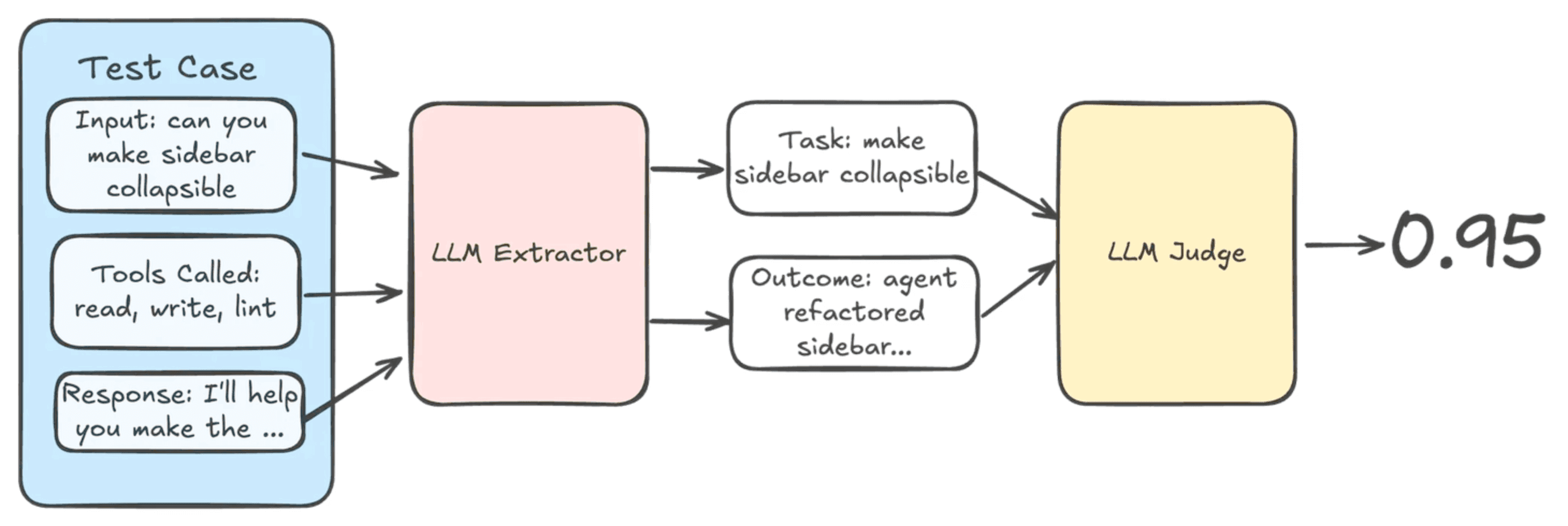
Tool correctness and task efficiency are purely quantitative metrics. Tool Correctness compares what tools were actually called against expected tool calls. Task efficiency tracks the number of input and output tokens necessary for a given task.
Tool usage and task completion are relative measurements using an LLM-as-a-judge. Tool usage compares the tool inputs with the original prompt and judges if the correct inputs were extracted. Task completion compares the original prompt against tools called and the final response to evaluate if the tasks in the prompt were all completed.
Experiment Design
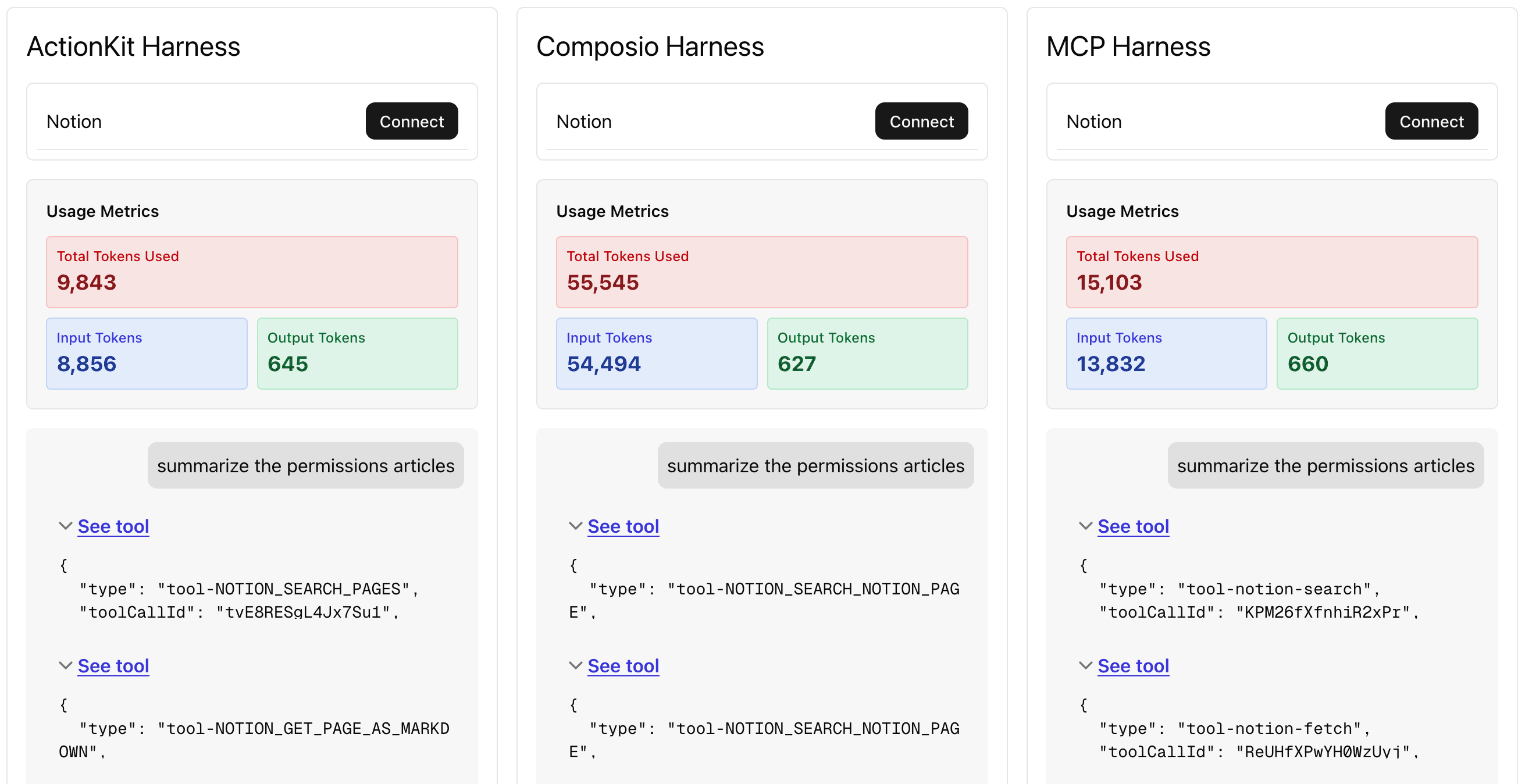
For this exercise, we used a Notion RAG use case to evaluate tool providers. Examples of Notion tools evaluated include NOTION-SEARCH, NOTION-GET-PAGE, NOTION-GET-BLOCK, and NOTION-GET-AS-MARKDOWN.
Of course this isn’t representative of every integration tool across ActionKit, Composio, and various MCP servers, but this exercise does show how each tool provider designs tools and how each design approach affects agent performance downstream.
For this Notion RAG use case, we created ~20 test cases with prompts to test tool usage and 3 harnesses/model combinations to test against the test cases.
Test Case
Based off my “LA” pages, what other activities and places should I check out
How many pages do I have per top-level page
Summarize all the content on “permissions”
Each harness / model combination consists of:
Notion tools from the tool provider (each provider had tools like NOTION-SEARCH and NOTION-GET-PAGE)
A Notion-specific system prompt
You are a Notion Knowledge agent. Your job is to retrieve relevant context from Notion when the user asks a question. Use the search_notion tool to scan for relevant page IDs and the get_notion_page tools to see page contents. Be as concise as possible unless the user explicitly tells you to expand.
One of three models: gpt-5-mini, claude-haiku-4.5, and gemini-3-flash.
With each of our three models, each tool provider harness would get 60 unique test runs.
Evaluation Results
Overall Results
Averaging across models, ActionKit’s harness achieved the highest tool performance score across the board.
Tool Provider
Tool Correctness
Tool Usage
Task Completion
ActionKit
78.89%
75.11%
74.22%
Composio
73.33%
72.22%
67.56%
Notion MCP
72.22%
70.89%
72.22%
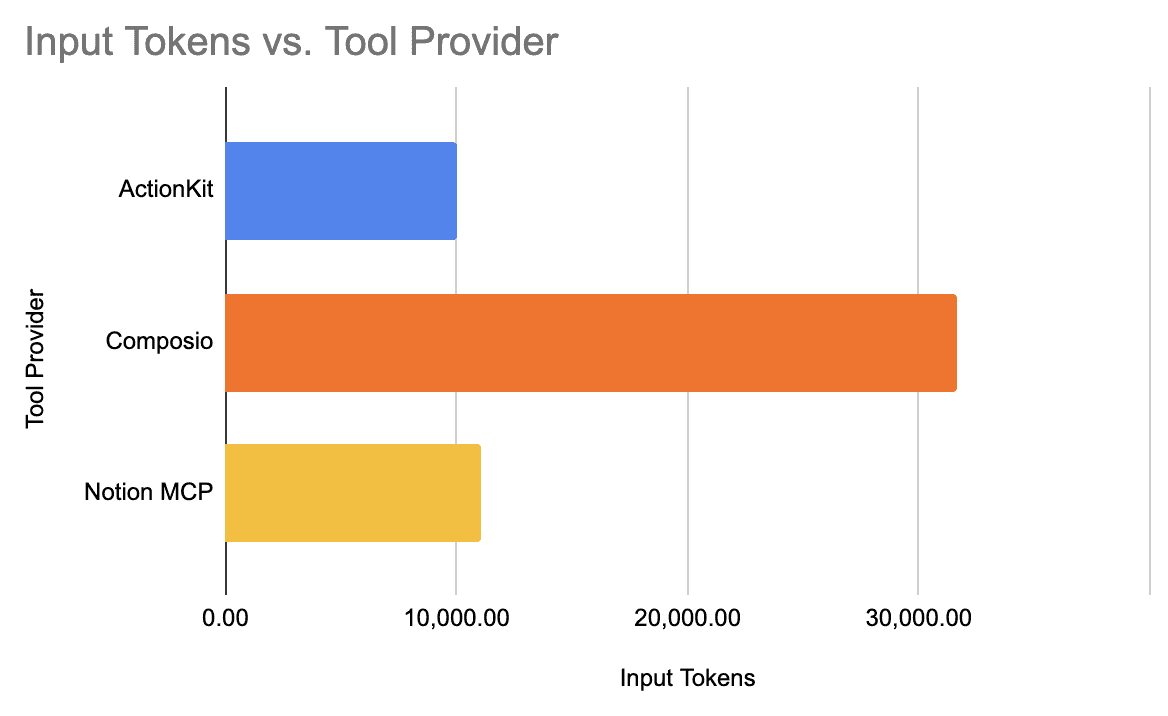
Not only did we observe high performance from ActionKit, but ActionKit-harness agents were able to have the most efficient token usage, balancing performance with efficient token usage and cost.
Tool Provider
Input Tokens
$/task
ActionKit
9,993.71
$0.008
Composio
31,638.38
$0.021
Notion MCP
11,023.71
$0.010
*prices from Vercel’s API Gateway rates as of 1/2026
ActionKit and Notion MCP had token usage that was fairly close. What stood out was Composio’s input tokens. Composio’s tool design has descriptions that are far more verbose than its counterparts. While this design may not have had the best overall metrics, Composio’s harness may be favored by certain models when we cross-cut our analysis.
Breakdown By Model
Looking at the metrics by harness and model, Composio tools perform far better in claude-haiku-4.5. Referencing the table below, Composio’s task completion with haiku (76%) is almost ten percentage points higher than its average task completion (67%). Further evidence that harness-model combinations can perform drastically different.
Looking at every harness’s best model combination, we see that Notion’s MCP tools with claude-haiku-4.5 had the best overall metrics across the 20 test cases. ActionKit’s best model combination, with a task completion of 78%, is not so different than its average task completion across models, working consistently well across models.
Tool Provider
Model
Tool Correctness
Tool Usage
Task Completion
ActionKit
gpt-5-mini
76.67%
74.00%
78.00%
Composio
claude-haiku-4.5
83.33%
82.00%
76.67%
Notion MCP
claude-haiku-4.5
90.00%
88.00%
88.67%
On the task efficiency side, gpt-5-mini had the lowest input tokens per task across all tool providers.
Tool Provider
Model
Input Tokens
$/task
ActionKit
gpt-5-mini
7668.13
$0.004
ActionKit
gemini-3-flash
13,193.07
$0.008
ActionKit
claude-haiku-4.5
9,119.93
$0.011
Composio
gpt-5-mini
27,015.13
$0.009
Composio
gemini-3-flash
36,922.80
$0.020
Composio
claude-haiku-4.5
30,977.20
$0.034
Notion MCP
gpt-5-mini
4,600.93
$0.003
Notion MCP
gemini-3-flash
9,524.33
$0.006
Notion MCP
claude-haiku-4.5
17,258.60
$0.020
To verify this result, we filtered on only completed tasks, thinking that perhaps input tokens were dragged down by tasks without the necessary tool calls. While we observed some variation on this cross-section (Composio tools had the least input tokens with claude-haiku-4.5), ActionKit and Notion MCP tools still had the lowest input tokens on completed tasks with gpt-5-mini.
Agent Design Takeaways
1. Harness and model selection matter
Don’t rely on using the frontier models to solve all tool calling problems. There can be huge performance variations within a model for tools that have the same functionality but different implementations.
Tool Provider
Model
Tool Correctness
Tool Usage
Task Completion
ActionKit
gemini-3-flash
83.33%
78.67%
75.33%
Composio
gemini-3-flash
73.33%
72.00%
64.67%
Notion MCP
gemini-3-flash
73.33%
73.33%
73.33%
Make evaluations part of your agent development process to monitor variations and improve on them.
2. Cost-efficient models can work with the right harness
It can be tempting to use the latest, most powerful model that everyone’s talking about on X. But smaller models that are faster and more cost-efficient shouldn’t be neglected.
For simpler tasks, even a cheaper model like gpt-5-mini can perform well with the right harness like ActionKit’s. The claude-haiku-4.5 is the cheapest of the Anthropic models and has an 88.67% task completion (this is high considering some of the prompts were vague).
3. Choose/design tools with LLM fundamentals
There will always be some level of variation in performance between models, but there are still fundamental prompting and tool design choices that all LLMs follow.
Tool descriptions and input descriptions matter. Balancing concise descriptions and rich context, like in ActionKit’s search-notion tool, results in agents that can complete tasks efficiently.
{
  "name": "NOTION_SEARCH_PAGES",
  "description": "Search Pages",
  "parameters": {
    "type": "object",
    "properties": {
      "query": {
        "type": "string",
        "description": "Query : The text that the API compares page and database titles against."
      },
      "objectType": {
        "type": "string",
        "description": "Object Type : The type of object to search for.",
        "enum": [
          "page",
          "database"
        ]
      },
      "direction": {
        "type": "string",
        "description": "Direction : The direction to sort the results by.",
        "enum": [
          "ascending",
          "descending"
        ]
      },
      "pageSize": {
        "type": "number",
        "description": "Limit : The number of records to return, returns all records if not specified."
      }
    },
    "required": [],
    "additionalProperties": false
{
  "name": "NOTION_SEARCH_PAGES",
  "description": "Search Pages",
  "parameters": {
    "type": "object",
    "properties": {
      "query": {
        "type": "string",
        "description": "Query : The text that the API compares page and database titles against."
      },
      "objectType": {
        "type": "string",
        "description": "Object Type : The type of object to search for.",
        "enum": [
          "page",
          "database"
        ]
      },
      "direction": {
        "type": "string",
        "description": "Direction : The direction to sort the results by.",
        "enum": [
          "ascending",
          "descending"
        ]
      },
      "pageSize": {
        "type": "number",
        "description": "Limit : The number of records to return, returns all records if not specified."
      }
    },
    "required": [],
    "additionalProperties": false
{
  "name": "NOTION_SEARCH_PAGES",
  "description": "Search Pages",
  "parameters": {
    "type": "object",
    "properties": {
      "query": {
        "type": "string",
        "description": "Query : The text that the API compares page and database titles against."
      },
      "objectType": {
        "type": "string",
        "description": "Object Type : The type of object to search for.",
        "enum": [
          "page",
          "database"
        ]
      },
      "direction": {
        "type": "string",
        "description": "Direction : The direction to sort the results by.",
        "enum": [
          "ascending",
          "descending"
        ]
      },
      "pageSize": {
        "type": "number",
        "description": "Limit : The number of records to return, returns all records if not specified."
      }
    },
    "required": [],
    "additionalProperties": false
{
  "name": "NOTION_SEARCH_PAGES",
  "description": "Search Pages",
  "parameters": {
    "type": "object",
    "properties": {
      "query": {
        "type": "string",
        "description": "Query : The text that the API compares page and database titles against."
      },
      "objectType": {
        "type": "string",
        "description": "Object Type : The type of object to search for.",
        "enum": [
          "page",
          "database"
        ]
      },
      "direction": {
        "type": "string",
        "description": "Direction : The direction to sort the results by.",
        "enum": [
          "ascending",
          "descending"
        ]
      },
      "pageSize": {
        "type": "number",
        "description": "Limit : The number of records to return, returns all records if not specified."
      }
    },
    "required": [],
    "additionalProperties": false
In terms of tool inputs, LLMs are not like methods in your backend services. If you have an input that has a lot of nesting and fields as a function input, your backend service may input these fields 99% correctly, but an LLM will need to extract those fields from a prompt. Make it easy for an LLM to extract inputs for more successful tool calls. The Notion MCP’s search-tool is a great example of a tool with fewer inputs and extended functionality.
{
  "name": "notion-search",
  ...
  "parameters": {
    "query": "Semantic search query over your entire Notion
      workspace and connected source (Slack, Google Drive, Github,
      Jira, Micrsoft Teams, Sharepoint, OneDrive, or Linear).
      For best results don't provide more than one question per tool call..."
{
  "name": "notion-search",
  ...
  "parameters": {
    "query": "Semantic search query over your entire Notion
      workspace and connected source (Slack, Google Drive, Github,
      Jira, Micrsoft Teams, Sharepoint, OneDrive, or Linear).
      For best results don't provide more than one question per tool call..."
{
  "name": "notion-search",
  ...
  "parameters": {
    "query": "Semantic search query over your entire Notion
      workspace and connected source (Slack, Google Drive, Github,
      Jira, Micrsoft Teams, Sharepoint, OneDrive, or Linear).
      For best results don't provide more than one question per tool call..."
{
  "name": "notion-search",
  ...
  "parameters": {
    "query": "Semantic search query over your entire Notion
      workspace and connected source (Slack, Google Drive, Github,
      Jira, Micrsoft Teams, Sharepoint, OneDrive, or Linear).
      For best results don't provide more than one question per tool call..."
The Notion MCP’s tool design is why their tool selection and task completion are extremely close across LLMs. If the LLM used the right tool, then it would almost always complete the task.
Tool Provider
Model
Tool Correctness
Tool Usage
Task Completion
Notion MCP
claude-haiku-4.5
90.00%
88.00%
88.67%
Notion MCP
gemini-3-flash
73.33%
73.33%
73.33%
Notion MCP
gpt-5-mini
53.33
51.33%
54.67%
ActionKit’s thoughtfully designed tools are built with LLM fundamentals, working well across LLMs and achieving the highest tool calling metrics for our Notion evaluations.
Wrapping Up
Building agents for your SaaS product’s use cases means choosing the right tools and potentially the right tool provider to integrate with 3rd-party platforms.
While this evaluation is by no means a comprehensive guide for the different integrations and integration tools your SaaS product needs, it’s a glimpse into each tool provider’s design patterns and developer experience.
Our overall takeaways from this exercise
Tool Provider
Developer Experience
Tool Performance (Notion)
ActionKit
8/10
9/10
Composio
9/10
6/10
Notion MCP
6/10
8/10
We encourage you to look into every tool provider for your integration use cases. With ActionKit and Composio, you have a single platform for all of your different use cases. With MCP servers, the experience may not be consistent across servers you want to integrate with, and certain servers may not be available for certain integrations you want to build for. (Read our write-up on how MCP fits into building integrations for more details).
Try out ActionKit for free in our trial, and book a call with our team for an ActionKit demo. We’d love to collaborate and help your team build agents that integrate with platforms your users are asking for.