

Company News
Introducing ActionKit Triggers: Subscribe to any integration event
ActionKit Triggers makes it easy to subscribe to any of your users' 3rd-party webhook subscriptions.

Jack Mu
Developer Advocate, Paragon
2 min read
Today, we're launching ActionKit Triggers, a single API to subscribe to your users' integration events, like "Slack message received," "HubSpot record updated," and "Notion Page created."
With ActionKit Triggers (or Triggers for short), integrations aren't just active when users are actively using your product. They're reactive. Your product can listen to events from your users' integrated tools around the clock for use cases like:
User-defined workflows in a workflow builder application
User-defined agents in agent builder applications
Background agents that trigger from events like Slack messages or GitHub PRs
Real-time automations where your application is listening for integration webhooks
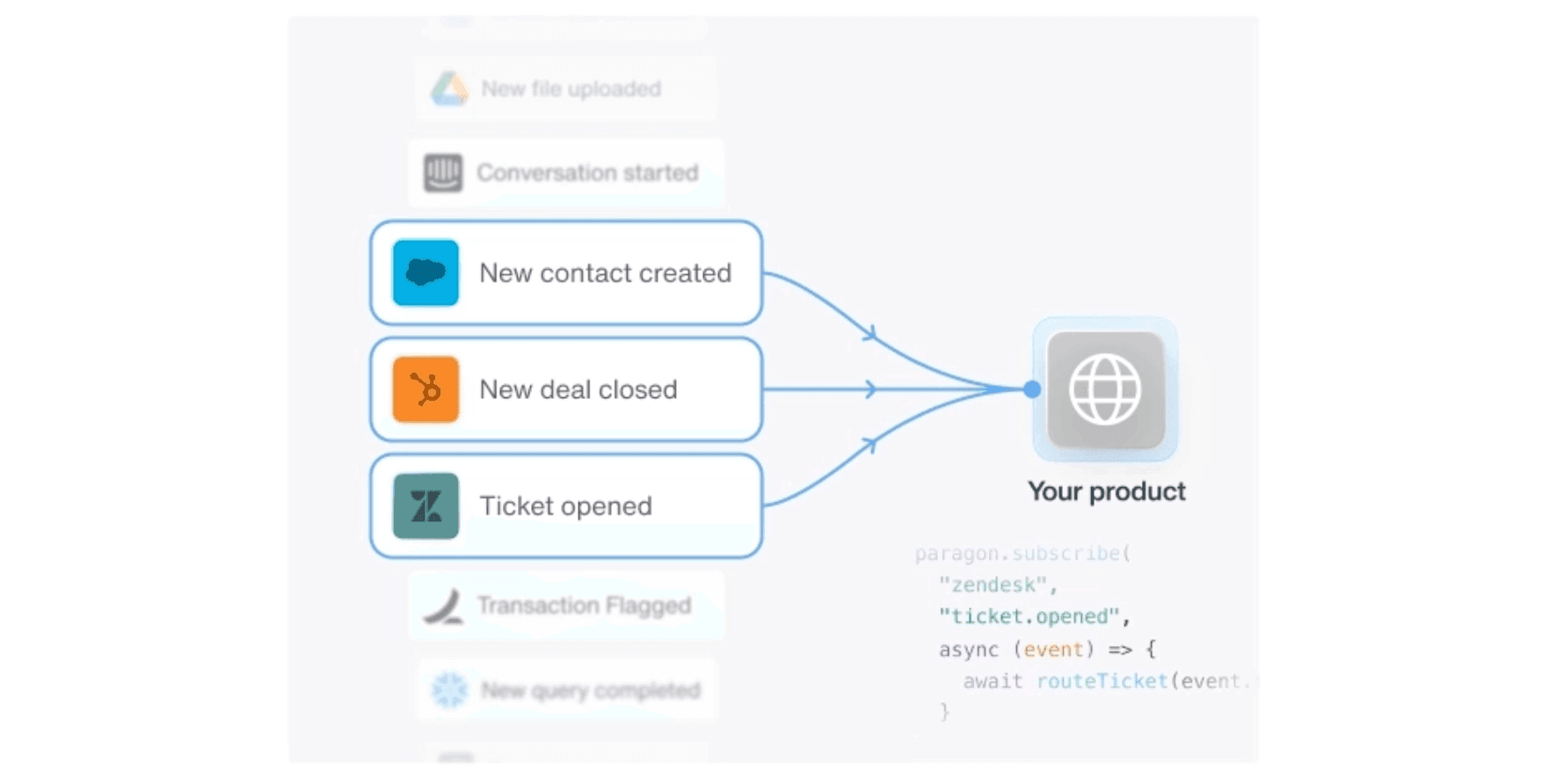
Why ActionKit Triggers
In the past, subscribing to different webhook events from different integration providers was an arduous and disparate process. Each new webhook subscription requires:
◻ Research into that integration's unique webhook policies (i.e. retries, signatures, handshake mechanisms, delivery policies)
◻ Additional infrastructure that requires high-uptime and high-durability, as webhooks can be easily missed
◻ New UI for end-users to configure their unique integration settings
◻ Tracing and observability across all webhook events
◻ Maintenance for all of the above, especially as downstream integration APIs change
We developed Triggers for customers that wanted a simple and standard way to reliably configure and subscribe to their users' integration events. Addressing the pain points of integration webhooks:
✅ Triggers is a unified API for subscribing to ALL of your integration webhooks
✅ Paragon manages the webhook infrastructure with the Triggers API to list available webhook subscriptions, subscribe to event buses, unsubscribe from events, and more*
✅ Triggers provides drop-in configuration so your end-users can select exactly what and how events are delivered
✅ All events are logged and traced in Paragon's Event Logs so you can see all of your users' events in the same interface as Workflows, Syncs, and ActionKit
✅ Paragon manages API drift to stay on top of breaking changes from downstream providers
*Paragon even creates polling infrastructure to create webhook-like events for integrations without webhook support
How ActionKit Triggers Work
ActionKit Triggers was built to be not only a universal API to subscribe to all of your users' events, but also a universal subscription model for these events.
Universal API
Use the POST trigger-subscriptions to subscribe to any integration event just by switching out the payload options.
Universal Subscription
All Triggers payloads are in a standard format and have the same validation (HMAC-256 signature), retry, backoff, and rate limiting policies.
ActionKit Triggers also features a GET /triggers endpoint for listing all triggers that a user can subscribe to, with their respective configurations and descriptions.
The GET /trigger-subscriptions allows you to fetch example webhook payloads that the subscription will deliver to your application.
These Triggers APIs enable workflow builders and agents to configure parameters and understand expected payloads directly.
ActionKit: Your Full Suite for Building Integration Features
ActionKit has two components: Triggers and Tools. Triggers are the focus of this announcement, but ActionKit Tools is the complement to Triggers.
ActionKit Tools is a unified API that provides hundreds of integration actions, like "Slack Send Message" and "Notion Create Page."
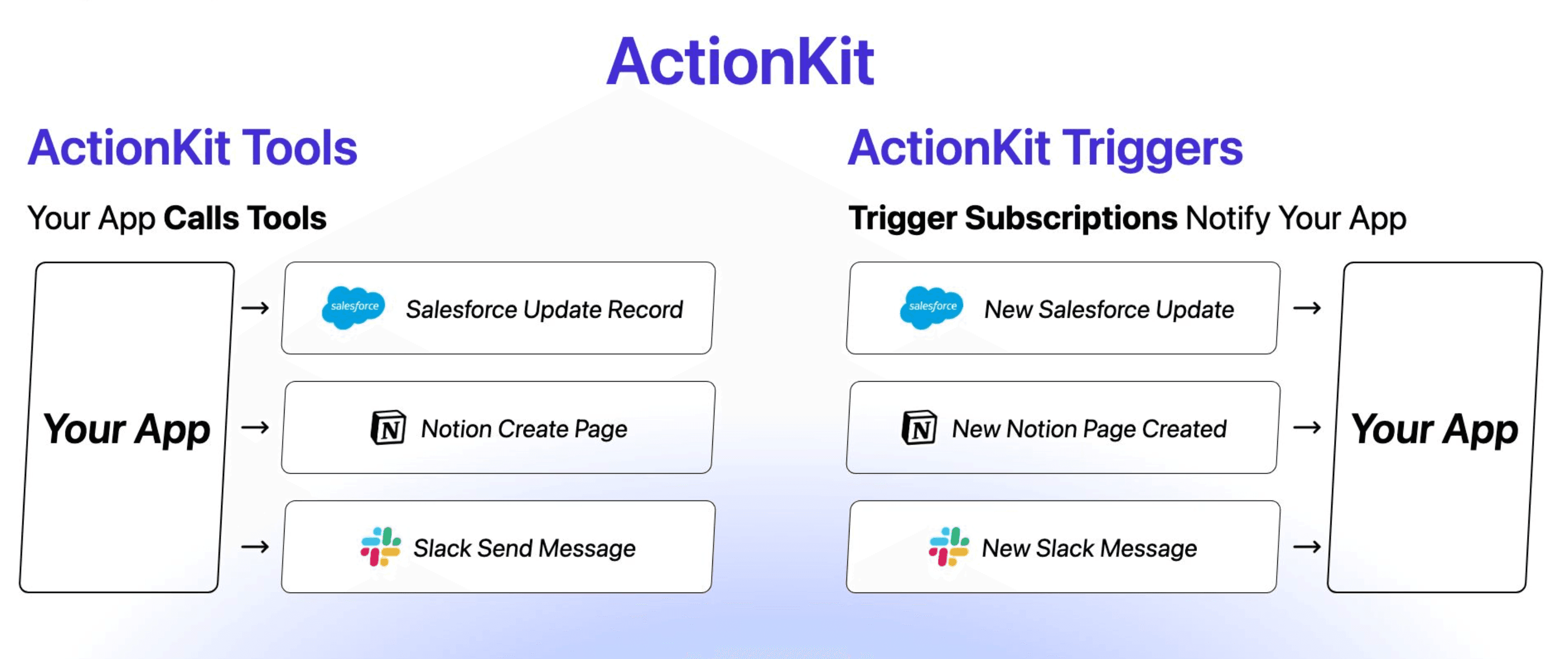
Tools is how your application interacts with integration APIs. Triggers is how your application reacts to integration events.
In tandem, ActionKit provides all of the primitives you need to build any integration feature.
For your workflow builder: Listen to your users' "Salesforce Record Created" event Trigger to initiate your users' defined workflow and call the "Slack Send Message" Tool to perform actions in Slack's API
For your background agent: Listen to your users' "Slack Message Received" event Trigger to kick off your AI agent with Tools like "Jira Update Ticket"
For real-time automations: Listen to your users' "HubSpot Record Created" event Trigger, perform data enrichment, and call the "HubSpot Record Update" Tool with the enriched data
Your application reacts to your users' integration events in real time and performs actions, all with Paragon-managed infrastructure.
This means unified APIs. No maintenance on 3rd-party APIs. Guaranteed performance on Paragon's infrastructure. Built-in monitoring and observability. And first-class developer experience for building integrations for agents and workflow products.
Get Started With ActionKit Triggers & Tools
ActionKit, with Triggers and Tools, are the best way to build fully featured integrations. Ship reactive integrations that perform actions for your users around the clock. Triggers keep your app subscribed to your users' integration events and Tools perform actions in those integrations.
If you’re ready to get started, sign up for Paragon on a free trial and check out the ActionKit docs to start building.
TABLE OF CONTENTS
Ship native integrations 7x faster with Paragon
Related articles








Ship integrations 10x faster with enterprise-grade infrastructure.
Trusted by enterprise platforms and AI products to handle integrations at scale.